
Printers are used in many different environments, but not every printing application requires the same type of device. A printer used inside industrial equipment has different design priorities from one intended for a home or office desk.
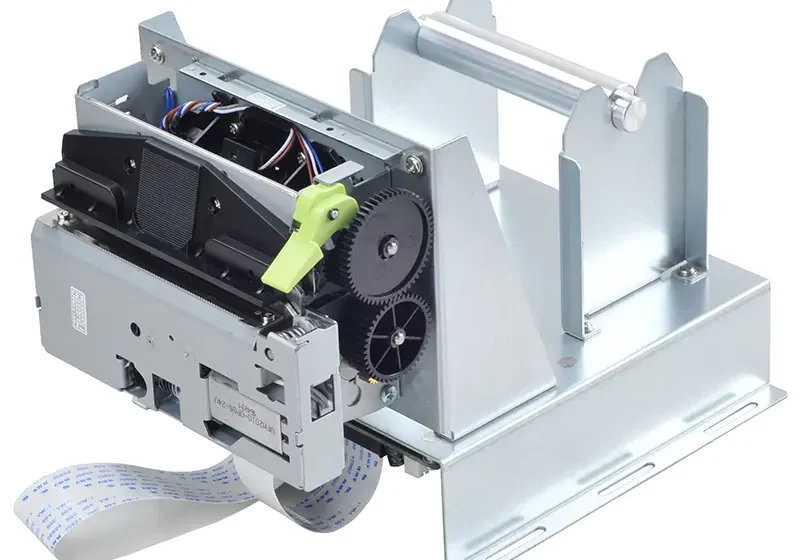
A Panel Printer is designed to be integrated into equipment such as control panels, kiosks, measuring instruments, and automated machines. A standard desktop printer, by comparison, is generally designed to operate as a separate peripheral connected to a computer or other host device.
What Is a Panel Printer?
A panel printer is a compact printing mechanism intended for integration into a larger piece of equipment. It is typically installed within a machine, enclosure, or control panel rather than placed on a desk.
Its compact form factor allows equipment manufacturers to add printing functionality without allocating space for a conventional standalone printer.
What Is a Standard Desktop Printer?
A desktop printer is designed as a complete, independent device. It generally includes its own housing, paper-loading system, user controls, and connections for computers or networks.
Desktop printers are commonly used for documents, reports, graphics, and other general-purpose printing tasks. Their larger size is usually less of a concern in an office or home environment where adequate desk or floor space is available.
Key Differences Between the Two
Size and Installation
One of the most obvious differences is physical design. Panel printers are built to fit into restricted spaces and can become part of the equipment enclosure.
Desktop printers generally require a dedicated surface and enough surrounding space for paper handling, cable connections, ventilation, and maintenance.
Intended Application
Panel printers are commonly used when printing is part of an automated process. Examples include printing measurements, transaction records, machine status information, labels, or event logs.
Desktop printers are better suited to general office and personal computing tasks where users need to print documents, images, spreadsheets, and other files.
Integration
An integrated printer must communicate with the equipment in which it is installed. Its interface and command structure therefore need to work with the machine’s controller, computer, or automation system.
A desktop printer typically connects to a computer or network using standard consumer or business printing protocols. The setup is often designed around direct user interaction rather than machine-level integration.
Paper Handling
Panel printers often use compact paper rolls to minimize the amount of space required inside equipment. Roll-based printing can also support continuous output for receipts, measurements, and event records.
Desktop printers commonly use individual sheets or larger paper trays. This makes them practical for conventional documents but less convenient for applications where a compact roll-fed mechanism is required.
User Interaction
Panel printers are frequently configured to operate automatically. A machine may send a print command when a measurement is completed, an alarm occurs, or a production cycle ends.
Desktop printers are usually operated through a computer, application, printer interface, or network. Users often select the document and printing options manually.
Comparing Common Features
| Feature | Panel Printer | Standard Desktop Printer |
|---|---|---|
| Installation | Integrated into equipment | Standalone |
| Space requirements | Compact | Generally larger |
| Typical media | Paper rolls | Sheets or specialized media |
| Main applications | Industrial and automated systems | Home, office, and business use |
| Operation | Often automated | Usually user-controlled |
| System integration | Designed for embedded applications | Designed for computers and networks |
| Maintenance access | Planned around equipment design | Generally straightforward external access |
When a Panel Printer Makes More Sense
A panel printer can be a practical choice when printing is only one function of a larger machine. For example, a measurement system may need to produce a small printed record after every test without requiring a separate computer and printer.
It can also be useful when installation space is limited. Embedding the printer directly into the equipment keeps the printing function close to the operator and the data source.
When a Desktop Printer Is More Suitable
A standard desktop printer is usually preferable when users need to produce full-size documents, high-quality graphics, spreadsheets, or large reports.
Desktop models also make sense when printing is a general office function rather than a dedicated part of a machine or automated process. Their larger paper capacity and broader document-handling capabilities can be useful in these environments.
Maintenance and Operating Considerations
The maintenance requirements of the two printer types can differ significantly. A panel printer may have a simpler mechanism and fewer consumable components, particularly when it uses direct thermal printing.
However, maintenance access must be considered during equipment design. If the printer is installed inside a machine, replacing paper or servicing the mechanism should be possible without unnecessarily disrupting other components.
Desktop printers are generally easier to access because they operate independently from the equipment. They may, however, involve cartridges, toner, multiple paper trays, or other components depending on the printing technology.
How to Choose Between Them
The best option depends on the purpose of the printing system rather than the printer category alone. Consider the following questions:
- Does the printer need to be installed inside equipment?
- How much physical space is available?
- Will printing happen automatically or through direct user commands?
- What type and size of media are required?
- Does the printer need to communicate directly with an industrial controller?
- Will the system print short records or complete documents?
- How will paper replacement and maintenance be handled?
Answering these questions can help determine which design is more appropriate.
Conclusion
Panel printers and standard desktop printers serve different purposes. Panel printers prioritize compact integration, automated operation, and point-of-use printing, making them suitable for industrial equipment, control systems, kiosks, and automated machines.
Desktop printers are designed for broader document-printing needs and are generally more appropriate for offices, homes, and other environments where a standalone device is practical. Understanding the differences in size, media, integration, operation, and maintenance can help businesses select the right printing solution for their application.